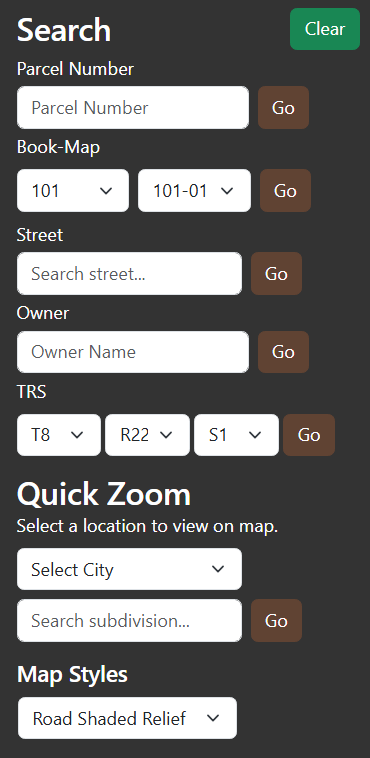
COUNTY PARCEL MAP - SEARCH TAB
The
Search Tab contains tools for manipulating the map display contents, as will as selecting parcels within the map. There are three components:
(1)Search: specific tools used to isolate desired parcel numbers or parcel number ranges.
- Parcel Number: enter the complete parcel
number of interest. Press the go button. To find all splits of
a given number, enter the complete parcel number without the trailing parcel split letter. Enter parcel numbers without
hyphens.
- Book-Map: this control is equipped with an
auto-complete function. First enter a desired assessor book,
Only valid books may be entered and the tool will help identify
valid book numbers. Once a valid book has been accepted, all valid maps within the book will auto-fill the map window.
Select the desired map and press go.
- Street: this control provides a wildcard
search for street name. Entering a portion of street name in the window will generate a list of like-street addresses.
Select the desired street. Pressing go will pull all parcels associated with the
wildcard value. A specific address may also be entered; however, it must match the specific address in order to be found.
- Owner: enter a portion of a desired owner name. Press go to start the search.
- TRS: use the drop down tools to designate which sector number to query for parcels.
(2) Quick Zoom: tools used to rapidly zoom into a specific geographic area.
- City: select an incorporated area to zoom to..
- Subdivision: select a named subdivision to zoom to.
(3) Map Styles: a variety of base map options used to provide context to the current information under
analysis:
- Blank: An empty map canvas with no background or labels.
- Blank Accessible: Similar to blank, but optimized for accessibility (higher contrast and simplified visuals for overlays).
- Gray Scale Dark: A muted dark gray base map.
- Gray Scale Light: A muted light gray base map.
- High Contrast Dark: Dark theme with strong color separation, designed for accessibility and compliance with WCAG guidelines.
- Night: A dark-themed base map optimized for nighttime or low-light viewing, with subdued colors and labels.
- Road: Standard street map with roads, labels, and geographic features. The default style for navigation and general use.
- Road Shaded Relief: Road map with shaded terrain relief, giving a sense of elevation and landforms along with roads and labels.
- Satellite: Aerial imagery without labels. Useful for visualizing land use, property boundaries, or natural features.
- Satellite Road Labels: Satellite imagery with road and place labels on top (hybrid style). Combines imagery with navigation context.