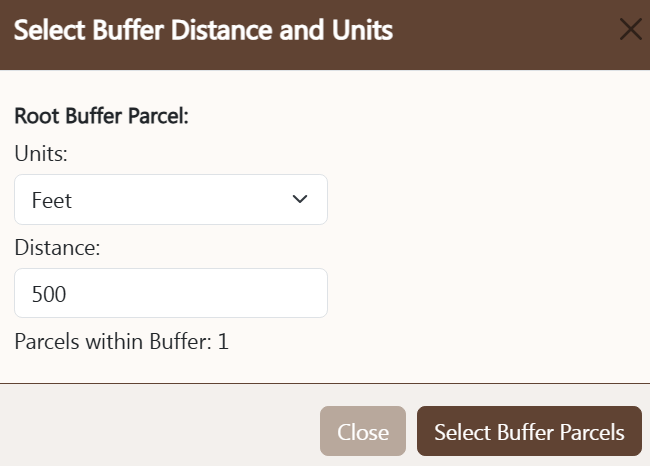
BUFFER CONTROLS
Buffer controls are used to locate other properties
within a user-specified distance of a location. The
buffer control is activated by the
buffer button also found on the Tools menu. To use the
buffer control follow these steps:
- Verify: Ensure the root parcel to buffer is correct.
- Units: select the desired buffer distance units (feet or miles).
- Enter Buffer Distance: enter the numeric distance from the root parcel group.
- Parcels within Buffer: once the buffer has been run, the number of other parcels within the buffer will display here.
- Select Parcels in Buffer: pressing this button begins the buffer process.
The result of this action will be a set of parcels within the specified
buffer distance.
- Cancel: pressing the cancel button will close the buffer control without
further action.
Once the buffer process is initialized, the buffer control will close and the map will zoom to the buffered area. The
print control may then be used to print
mailing labels or create an Excel export file.